
Browser tools for everyday business data
Three of our 26 free tools have English guides. You can clean a CSV file, mask personal details in selected columns or map Dutch postcodes. The tool controls are in Dutch. The Dutch edition covers all 26 tools, and you can try 11 business system demos in English using fictional data.
Updated
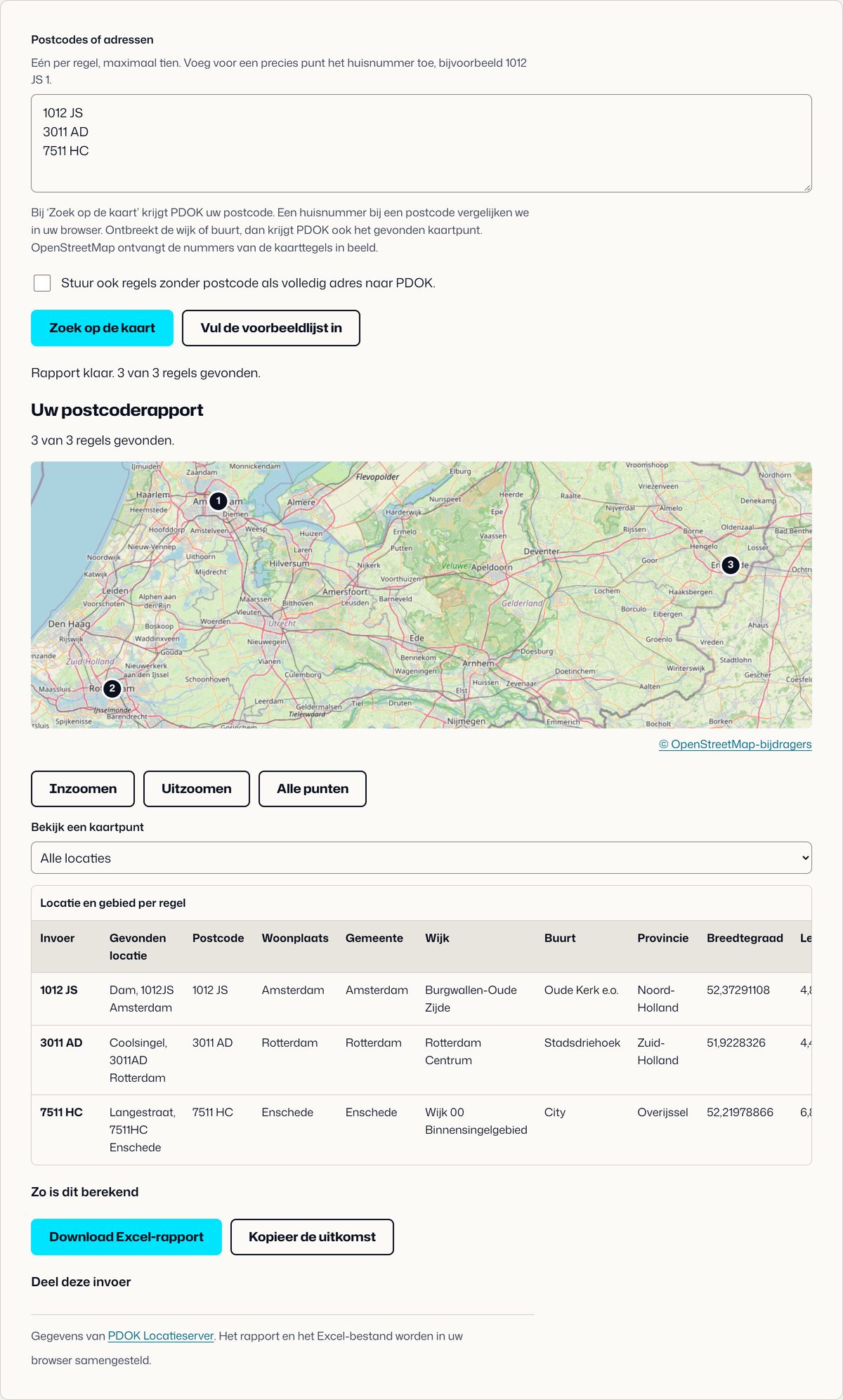
Postcode report with three looked-up postcodes in Amsterdam, Rotterdam and Enschede, on the map and in a table
Tasks and results across the full tool collection
| Task | What you get |
|---|---|
| Calculate Dutch VAT or an hourly rate | An amount before and after Dutch VAT, or an hourly rate based on your costs and billable hours. |
| Estimate the cost of a website or an app | An estimate for the options you choose, with the build cost and recurring costs shown separately. |
| Create an invoice or a quote | A PDF with your own line items and amounts, ready to save or send. |
| Generate a QR code or a password | A QR code you can save as an image, or a password or passphrase you can copy. |
| Clean a CSV file or mask personal data | The cleaner standardises postcodes and phone numbers, then compares whole rows. It keeps one copy of each identical row and treats Ab-7 and AB-7 as different customer IDs. The anonymiser masks identifying details in the columns you choose. Both tools handle up to 50 data rows at a time. |
| Create a Dutch postcode report | A map and table for up to 10 Dutch postcodes or addresses. For each match, you see the municipality and, where available, the district and neighbourhood. |
| Generate a sitemap or a robots.txt file | A sitemap listing your page addresses or a robots.txt file with instructions for web crawlers. |
| Calculate a margin or break-even point | The margin and markup on a sale, or the number of sales needed to cover your costs. |
| Add up hours worked | The length of a shift after breaks, in minutes and in decimal hours for an invoice. |
| Resize, crop or convert an image to WebP | An image file to download. You can check its dimensions in pixels and its size in bytes first. |
| Create a favicon | Three PNG files based on your logo, with the HTML you need to show the icon on your website's browser tab. |
| Check colour contrast or convert an HTML colour code | The contrast ratio between text and background against WCAG 2.2 thresholds, or the RGB value for a HEX code. |
| Count words or build a campaign link | Word and character counts for your text, or a web address tagged with the campaign source, medium and name. |
| Format JSON or convert CSV to Excel | Formatted JSON showing the line and column of an error, or an Excel workbook where you choose text or numbers for each column. |
Setting an hourly rate when you have fewer billable hours
Suppose you set aside one afternoon a week to prepare quotes. In the Dutch hourly rate calculator, enter your costs, target income and billable hours. Then reduce just the billable hours. You'll see how much more you need to charge per hour to earn the same income.
Where your data goes
The CSV cleaner and anonymiser process your file in your browser. Their share links open a built-in example with fictional data. To share your own results, check the downloaded file before you send it.
The postcode report sends each postcode to PDOK, the Dutch public mapping service. Your browser checks the house number. If district or neighbourhood information is missing, the tool also sends the map coordinates to PDOK. It asks permission before sending a full address for a row without a postcode. OpenStreetMap supplies the map tiles. The share link opens three sample postcodes. Your own entries appear in the results table and Excel download and stay out of the link. The calculators work differently. Their share links put your figures after the hash sign (#). Your browser leaves that part out of the request to the website, but anyone with the full link or access to your browser history can read the figures.
Try a business system with sample data
Follow a sales opportunity, prepare a quote or book an appointment. In the portal, switch between the customer's view and the office view. In the dashboard, select a revenue figure to see the orders behind it. You can also record time on a job sheet, check stock by location, schedule an urgent job for a technician, handle a split delivery and a return, cancel a membership or issue a credit note against an invoice. The service pages below explain what goes into building these systems for your business.
- Custom CRMA CRM built around your contacts, sales pipeline and tasks, with a fixed setup price and one monthly fee for unlimited users.
- Custom quote buildersTurn a price list and product options into a repeatable quote. See how rules, exceptions and the customer PDF can be agreed and tested before delivery.
- Custom booking system developmentMap availability, bookings, changes and reminders before commissioning a system. See how to test a full appointment and two requests for the same slot.
- Custom customer portalsLet customers find their drawings, job status and latest message in one place. See what the customer and the administrator each see in the same job file.
- Custom business dashboardsCheck invoiced revenue against delivery notes. Follow 12 crates across three deliveries and see why two appear on an invoice for the following month.
- Time tracking softwareTrack staff time by job and task. Follow a disputed entry from the signed job sheet to approval and see which hours go on the customer's invoice.
- Stock management softwareSee how much stock you can promise for the next job. Follow a box of gaskets from delivery to use and reconcile a shelf count with the stock record.
- Membership management softwareFollow a cancellation through the membership list and monthly fees. See who can adjust the balance and how an incoming treasurer checks what is still due.
All topics
- Clean a CSV fileClean up to 50 rows of a CSV or Excel file. Remove duplicates, standardise Dutch postcodes and phone numbers, and download a copy with notes.
- Dutch postcode reportsLook up the neighbourhood, district and municipality for Dutch postcodes. Map up to ten entries and download the results as an Excel report.
- Mask CSV dataMask or replace personal data in up to 50 rows of a CSV or Excel file, or remove whole columns. Check what others could still identify before sharing.
Read next
- PricesSee the one-off cost of each service, any monthly fees and which services have a starting price.
- AI assistant for your team€900 excl. VAT
- Small business app developmentfrom €1,900 excl. VAT
- Offline web app developmentfrom €1,900 excl. VAT
- Custom web appsfrom €1,900 excl. VAT
- Corporate video production€850 excl. VAT
Request
Tell us what you need
You will hear back within one working day from Eloy Evers, who also builds it. Then you get a proposal with a fixed price.
Prefer email?
eloy@hyperhtml.nl