
Replace a shared Excel file with a custom app
Replacing Excel with a custom app makes sense when one person enters the figures and someone else relies on the calculation. We build these apps for a one-off fee from €1,900 excl. VAT, plus €49 per month. We agree a fixed price for each phase based on the work you want to move out of Excel.
Updated
From a spreadsheet row to a job sheet
Suppose your technicians record their hours on job sheets. Back at the office, someone types the start time, finish time and break into Excel. A blue cell means the work is under warranty. Payroll needs to count those hours, and the person raising the invoice needs to leave them off the bill.
Put two job sheets beside the spreadsheet, one for a standard job and one for warranty work. For each column, ask who has the information and who has to type it in again. Check the notes in the margins too. If a blue cell means the work is under warranty, make that a choice on the job sheet so the rule carries over into the app.
How spreadsheet columns become fields in the app
In this example, each technician has a separate job sheet for each visit. Its unique number lets you match the sheet in the app to the original spreadsheet row after the trial import.
| In the spreadsheet | In the app | Who uses it |
|---|---|---|
| Number in column A | Job number (required and unique) | The technician records the job |
| Start, finish and break | Start and finish times, plus the break in minutes | The technician enters the hours worked |
| Blue cell background | A choice of standard or warranty work | The planner checks the type of work |
| Formula for hours | Separate totals for minutes worked and minutes to bill | The accounts team uses the approved figures |
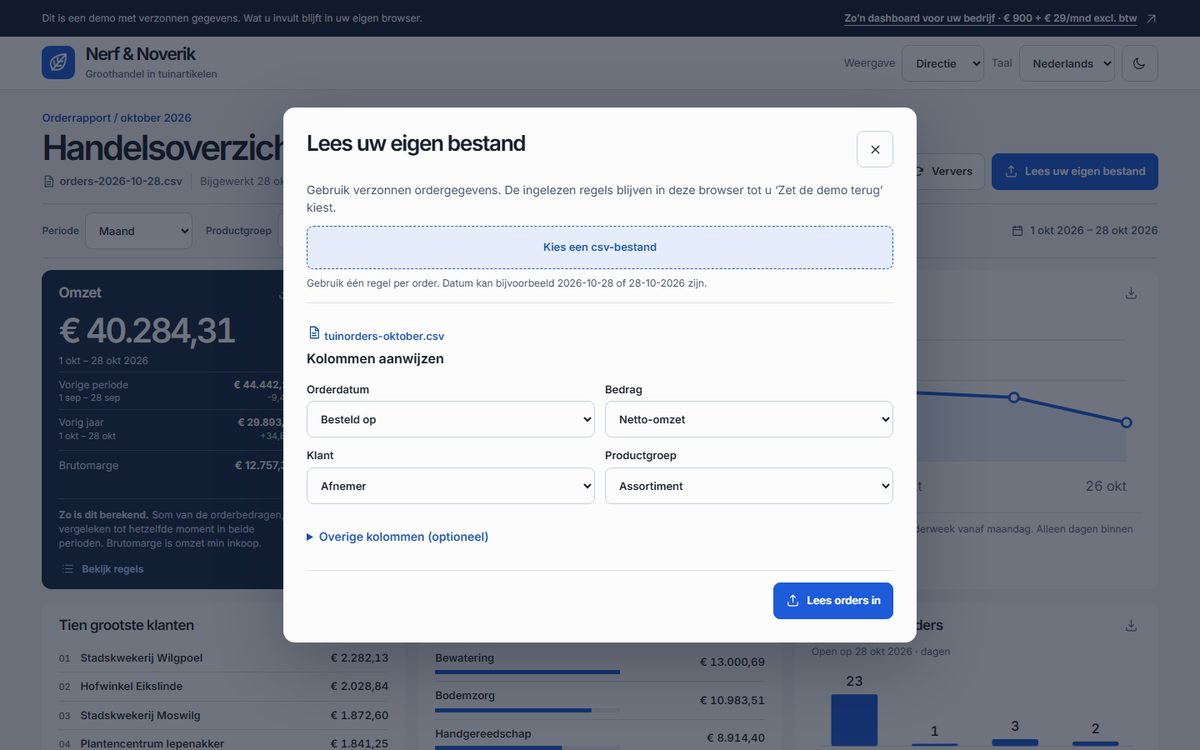
The import window of the dashboard demo shows four matched columns from the samp
Testing the formula on warranty work
Job W17 runs from 08:00 to 11:30 on the same day. Subtract the 15-minute break from those 210 minutes and you have 195 minutes worked. That is 3 hours and 15 minutes, or 3.25 hours if your accounts team uses decimals. For a standard job in this example, you can bill all 195 minutes.
On warranty job W18, the technician works from 13:00 to 14:00 without a break. The same formula gives 60 minutes worked. Selecting warranty work brings the billable total to 0 minutes. If the finish time is missing, the job sheet should go back to the planner. Treating a blank as zero would let an incomplete sheet through.
How to check a trial import
Include the awkward rows
For the quote, send us an anonymised copy with the formulas intact. Tell us which colours, comments or manual corrections affect the result. To try this example, make four rows. Include two different jobs, an exact copy of one of them and a row with no job number.
Count the rows you can use and the ones to review
You should have two job sheets to process and two rows to review. The duplicate accounts for one of those rows and the missing number for the other. Now check the totals for the two valid jobs. With the times for W17 and W18, you should get 255 minutes worked and 195 minutes to bill.
Test the handover between people
Sign in to the test site as a technician and fill in a job sheet. Open it as the planner and mark the job as warranty work. Then check the result as a member of the accounts team. Can the technician still edit an approved job sheet? Agree beforehand who should handle a correction after approval.
Agree where to enter new jobs
Keep using the spreadsheet for day-to-day work during the trial. Track any job sheets added or changed since the trial import and check those when you switch. If the counts differ, keep entering jobs in the spreadsheet until you find the discrepancy. If you need to switch back later, first stop entering jobs in the app. Make a single list of every sheet added or changed since the switch. Match them by job number, copy over the latest times and approval status, and check the total minutes before anyone starts entering jobs in the spreadsheet again.
Price
A quote for replacing your spreadsheet
What the price from €1,900 includes
- One working system for a single process from start to finish, including screens, data and user roles
- We agree a fixed price for each phase in advance. We quote for the next phase before you commission it
- A preview link where you can follow progress from the first week
- An acceptance test using your own data
- A handover with an operating guide
What is not included
- A complete business platform in one go. We build it in phases, each with its own fixed price
- Licences for third-party systems
What €49 a month covers
Hosting in the European Union, daily backups with a test to check that the data can be restored, security updates, monitoring and help within one working day if a fault occurs.
What you pay in total
- First year
- from €2,488 one-off price plus twelve months, excl. VAT
- Each following year
- €588 twelve months, excl. VAT
The first-year total uses the starting price for the build. To quote a fixed price for the phase, we need to know which worksheet your process starts on and when you consider a job complete. Agree which existing records to migrate and which trial import the first phase covers.
Always
- We agree a fixed price upfront. The price in our proposal stays the same as long as the scope stays the same
- You can follow progress at a preview link while we build
- At delivery you receive a handover pack with everything covered by your project, in your name
- Half when you accept the proposal, half on delivery
HyperHTML works for businesses and organisations only. All prices exclude VAT; for businesses in the Netherlands we add 21% Dutch VAT.
Questions
Questions about replacing Excel
When does it make sense to keep the spreadsheet?
Keep Excel if you enter the data yourself, adjust formulas regularly and nobody has to wait for your approval. We build custom software. The handover from one person to the next is a good reason to consider an app. If you want to keep entering data in Excel and make the results easier to read, consider a business dashboard.
How do I find duplicate job numbers before I move the data?
Work on a copy and select the job number column. On the Home tab in Excel, open Conditional Formatting, then Highlight Cells Rules and Duplicate Values. Check the highlighted rows against the original job sheet. If the times differ, ask the planner which row is correct. Two entries with the same customer name may simply be two separate visits.
Do all our old worksheets need to move into the app?
Choose a cut-off date. Identify which jobs still need attention and which past years you need for reference. You can keep the records for those years in a spreadsheet. Agree how much data to move before you accept the quote for the custom app.
Can another developer take over the app later?
Yes. Once you have paid in full, HyperHTML transfers the rights to the custom work. At handover you receive the code and the operating guide. For components we reuse, your licence allows another developer to maintain them for you. Our terms set out the details.
Sources
- Dubbele waarden zoeken en verwijderen (in Dutch). Microsoft Support, accessed 19 November 2026.
Read next
- PricesSee the one-off cost of each service, any monthly fees and which services have a starting price.
- AI assistant for your team€900 excl. VAT
- Small business app developmentfrom €1,900 excl. VAT
- Offline web app developmentfrom €1,900 excl. VAT
- Custom web appsfrom €1,900 excl. VAT
- Corporate video production€850 excl. VAT
Request
Tell us what you need
You will hear back within one working day from Eloy Evers, who also builds it. Then you get a proposal with a fixed price.
Prefer email?
eloy@hyperhtml.nl