
Six customer portal options and the cost of connecting an existing portal
These published prices in euros cover customer access to records. There is also a separate rate for connecting a portal you already have. The comparison includes suppliers in the Netherlands and Germany. Check the terms in each row to see whether the supplier charges per user, per project or per month.
| What you need | Price and billing terms | Supplier and what's included |
|---|---|---|
| Customers only need to download their own invoices. | €0 in licence fees on Odoo Online's One App Free plan. | An option if you invoice in Odoo and the standard customer view meets your needs. External customers can view the portal without a paid user licence. You configure invoicing yourself or pay for help. Odoo pricing and portal documentation. |
| You want to share information from your CRM with customers. | €200 for the organisation + 20 × €1 for the first bundle of customer logins = €220 per month. | One internal user and twenty customer logins. Customers can view shared documents and track progress. There is no setup fee. The initial term is 12 months and prices are index-linked annually. CRM Force |
| You already have a portal and a document management system. | Integration alone starts at €1,900 as a one-off fee. Ongoing support from the supplier starts at €149 per month. | Indicative price for one defined task between two systems. Your existing portal has its own cost. myInterface, Germany |
| You need a portal for an existing workspace or a standalone system. | From €2,750 for a portal added to an existing workspace. A standalone portal with its own admin area starts at €5,250. Maintenance with hosting starts at €125 per month. | Customers can view a schedule or a quote, for example. Thomas van der Kuijl |
| Customers need individual logins for files or invoices. | The build starts at €4,500. Hosting and maintenance together start at €35 per month, depending on how complex the portal is. | Customers can also track progress. The developer charges no per-user fee. Yon Digital |
| Customers need to complete one task themselves. | From €7,900 per project. Optional support and hosting start at €249 per month. | For example, customers can submit documents and check their status. Customers and staff have separate ways to sign in. HELMOR Software, Germany |
| Your first release needs to show customers their documents and progress. | €4,500 to €20,000 for the first release. | The developer agrees the scope, then quotes a fixed price. The range is its estimate for this kind of project. AxiOps |
One inspection report, two ways to share it
Suppose you inspect buildings. Each client should be able to read their own final report. You already have a workspace for inspection jobs. In the first option you upload the report yourself. In the second, the portal retrieves the approved report from your document management system. The client sees the same report either way.
| Budget item | You upload the report | The portal retrieves the report |
|---|---|---|
| One-off build | €2,750 for the portal | €2,750 for the portal + €1,900 for the integration |
| Monthly support | €125 | €125 + €149 |
| Total after 1 year | €2,750 + 12 × €125 = €4,250 | €4,650 + 12 × €274 = €7,938 |
| Total after 3 years | €2,750 + 36 × €125 = €7,250 | €4,650 + 36 × €274 = €14,514 |
What the extra cost buys you in working hours
In this budget, retrieving reports automatically costs an extra €7,264 over three years. Suppose you share 30 reports a month and spend three minutes preparing and checking each one. That adds up to an hour and a half each month, or 54 hours over three years. Even if you save all that time, each hour saved costs around €135. If you still need to check reports manually, the cost per hour saved rises.
For a month, also note how often you have to replace a report. If a client reads an old version, they could order the wrong repair. If you issue frequent revisions, knowing which version the client sees may matter more than time saved. If you issue few reports and rarely replace them, uploading them yourself may be enough to start with.
Who can see each report
A second client doesn't necessarily need a second type of access. If two clients each manage their own building, you can test the same rule for both. If a property manager needs to see every building belonging to one owner, while a tenant should only see repair recommendations for their floor, you need different rules.
Give the developer a specific example for each role. For report R17, the owner can read the full report. The tenant sees only the arrangements for their floor. An external engineer can open the work order until the job is complete. Specify who revokes access. The developer can then price any additional work separately, and you can test each case at handover.
Getting the right version from another system
Decide where a member of staff will approve a report for release. If your document management system is the source, show the developer a draft report, the final version and a later correction. Specify which version belongs to which customer number and what should happen if someone withdraws a report.
Ask the document system supplier whether your licence includes access to its API, the interface the portal can use to request documents. Confirm that the portal can retrieve the file itself on behalf of the right customer. A list of filenames won't let a customer read the inspection report. When commissioning an integration, specify which way the data travels. Displaying a report involves different work from sending the client's response back.
Send the notification only once the intended recipient can open the report. Agree what clients will see if the document system is temporarily unavailable. Showing the date of the last confirmed version can help them tell how current an inspection report is.
Getting quotes you can compare
Give two suppliers the same test case. Use two fictional clients, a document they are allowed to see and a withdrawn version. State how many reports you issue each month, the size of a typical file and the size of your largest attachment. Specify how long clients need access to old reports so both suppliers can estimate storage on the same basis.
Ask for separate figures for the build, ongoing support and access to your other software. Find out who investigates if a customer receives a notification but can't see the report. For a comparison with HyperHTML, see what our customer portal price includes.
HyperHTML's customer portal price
HyperHTML also builds customer portals. Below you can see which work our price includes.
Included for €900
- An individual login for each customer
- A file for each customer with documents, current status and messages
- An admin area where you manage customers and permissions
- An email notification when something new is available
- In your own style, at a dedicated web address
- We check that no customer can see another customer’s information
What is not included
- Electronic signatures
- Payments in the portal
- An integration with your accounting software or CRM (for a fixed price per integration)
What €49 a month covers
Hosting in the European Union, daily backups with a test to check that the data can be restored, security updates, monitoring and help within one working day if a fault occurs.
What you pay in total
- First year
- €1,488 one-off price plus twelve months, excl. VAT
- Each following year
- €588 twelve months, excl. VAT
Always
- We agree a fixed price upfront. The price in our proposal stays the same as long as the scope stays the same
- You can follow progress at a preview link while we build
- At delivery you receive a handover pack with everything covered by your project, in your name
- Half when you accept the proposal, half on delivery
HyperHTML works for businesses and organisations only. All prices exclude VAT; for businesses in the Netherlands we add 21% Dutch VAT.
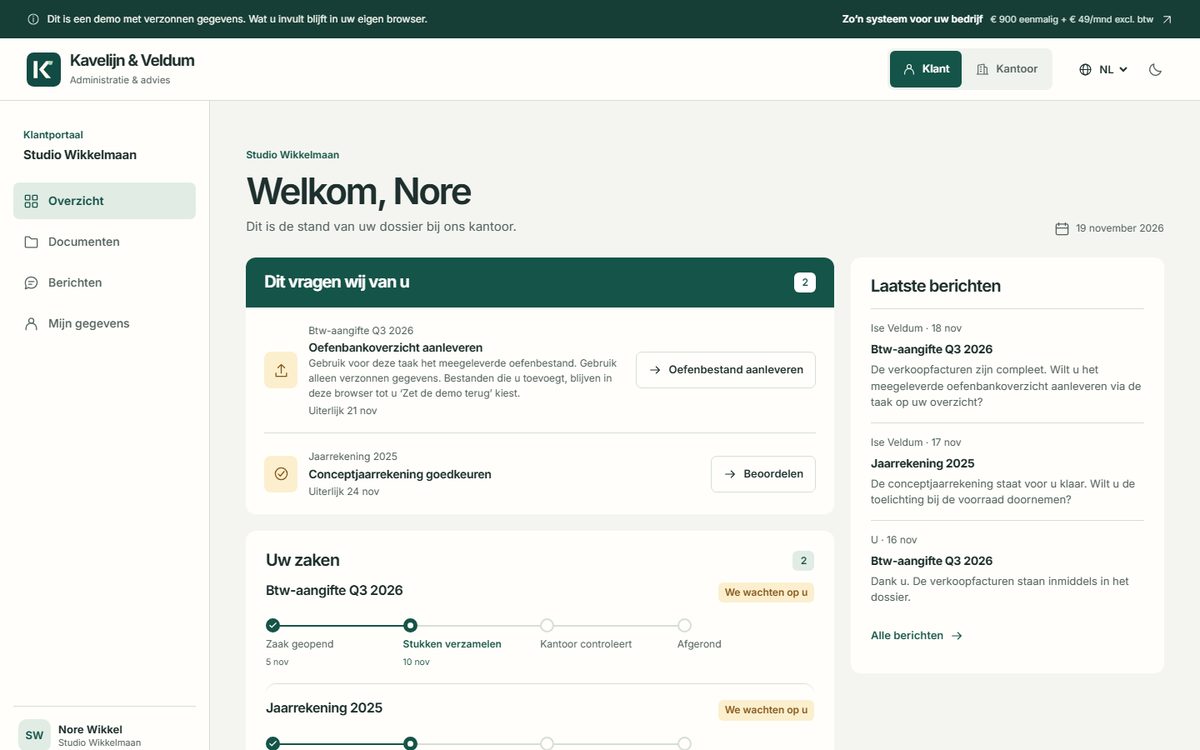
Questions to ask about a customer portal quote
How can two people at the same client organisation get access?
Specify which records each person may open. A property manager responsible for several buildings may need different access from someone who looks after one site. Ask whether the supplier charges per person, per organisation or per bundle of logins. Agree how to close one person's account when they leave.
How can I estimate storage costs?
Count the records you keep and the files in each, then measure the average file size. With 100 records containing four files of 5 MB each, the files alone take up about 2 GB. Ask separately about older versions, backups and charges for storage above the agreed allowance.
How do I compare an integration with uploading files myself?
Take a report you corrected after sending it. Time how long it takes to withdraw the old file, upload the new version and notify the recipient. Ask the developer to price those same steps. You can then compare what it costs you to deliver the same result.
Sources
- Prijzen van Odoo Online (in Dutch). Odoo, accessed 19 November 2026.
- Gebruikersportalen in Odoo 20 (in Dutch). Odoo, accessed 19 November 2026.
- CRM op maat als abonnement (in Dutch). CRM Force, accessed 19 November 2026.
- Kosten per onderdeel en onderhoud (in Dutch). Thomas van der Kuijl, accessed 19 November 2026.
- Ablauf und Preise (in German). myInterface, accessed 19 November 2026.
- Maatwerk tools en klantenportalen (in Dutch). Yon Digital, accessed 19 November 2026.
- Btw bij de genoemde prijzen, artikel 3.2 (in Dutch). Yon Digital, accessed 19 November 2026.
- Kundenportal entwickeln lassen (in German). HELMOR Software, accessed 19 November 2026.
- Prijzen per traject (in Dutch). AxiOps, accessed 19 November 2026.